Card Normals
A free Blender add-on that makes flat cards shade as one volume. Hair cards borrow the scalp, leaves borrow the canopy, grass points at the sky — over every selected object at once.
Drag the .zip into Blender, or
Edit ▸ Preferences ▸ Get Extensions ▸ ▾ ▸ Install from Disk.
Not on Blender Extensions yet. Install the
.zip above; the listing is still to come.
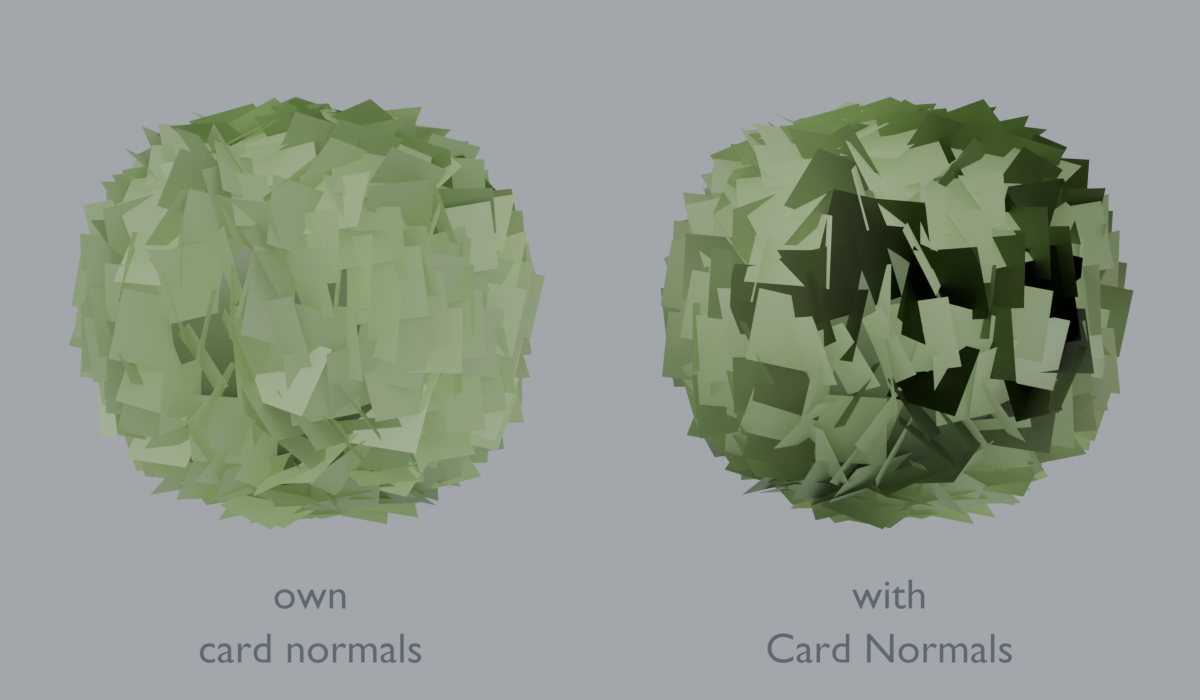
The problem
Hair cards, foliage and grass are flat planes with an alpha texture. Lit by their own geometry, they read as flat planes: each card catches light on its own, and a head of hair breaks up into separate quads instead of holding together as one mass.
The fix is to stop using the card's own normals and borrow the shading of the volume the card belongs to — the scalp under the hair, the canopy of the tree, the ground under the grass.
What it does
| Source | Normals come from | For |
|---|---|---|
| Surface | The closest point on a proxy mesh, interpolated across the face | Hair on a scalp, leaves on a trunk |
| Pivot | A point — the object's own origin, or an empty you pick | Bushes, canopies, anything read as a sphere |
| Axis | One fixed direction | Grass and ground cover |
- Blend from the mesh's own normals to the computed ones, so the effect can be dialled rather than switched.
- Runs over every selected mesh in one go — hair is rarely one object.
- Writes real custom split normals, so what you see is what FBX and glTF export.
- Clear puts the geometry's own shading back.
Using it
- Sidebar in the 3D viewport (
N) → Cards tab. - Pick a source. For hair, choose Surface and set the proxy to the head or scalp mesh.
- Select your cards and press Set Card Normals.
The proxy is sampled after its modifiers, so a subdivided or shrinkwrapped scalp is read at the shape you see.
Compared with doing it by hand
Blender can already do this with a Data Transfer modifier, and that is the honest comparison. The modifier needs Face Corner Data enabled, Custom Normals ticked, the mapping switched off its default, the source object set, and the whole thing applied — per object. This is the same result with the mapping already correct, over a selection, plus the pivot and axis sources the modifier has no equivalent for.
Getting the cards themselves is the other half of the job.
Hair Cards for Blender — turn hair curves into game-ready cards with atlas UVs, in one operator. $29 one-time, in development.
Requirements
- Blender 4.2 or newer.
- Mesh objects with faces. Custom normals need smooth shading, which the add-on sets unless you turn that off.